KaeloFlow puts everything you collect, think, and make on one board.
KaeloFlow is a giant zoomable board where every link, note, image, and AI answer lives as a card you can move, connect, and find again. A built-in wiki for long docs, an AI chat beside your work, an image & video studio, and a calendar to plan what you publish.
3-day Pro trial · No credit card required
Works with the tools you already use
Embed YouTube videos and Figma files right on the board, and paste a link from anywhere: Drive, Docs, Dropbox, Loom, GitHub, arXiv. Each one becomes a card with its title and preview.
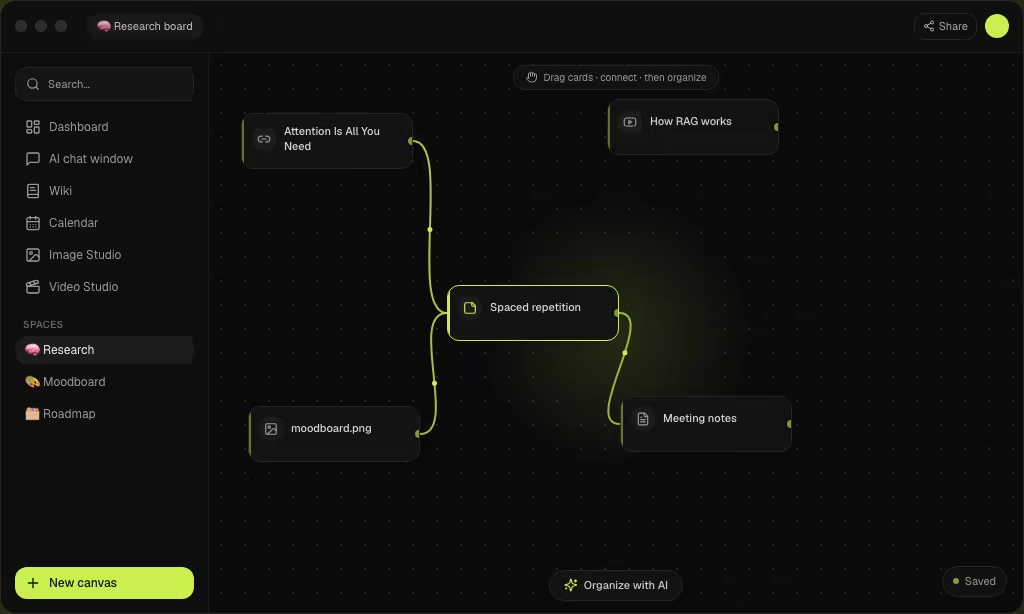
A board with no edges, where everything is a card
The canvas is your workspace: a zoomable board that never runs out of room. Paste a URL and it turns into a card with the page's title, image, and source. Drop in images, PDFs, videos, and notes, drag them anywhere, and draw wires between the ones that belong together.
- Paste a link and it becomes a preview card automatically
- Images, PDFs, YouTube & Figma live right on the board
- Connect related cards with wires to map your thinking
Chat with Claude, GPT and Gemini
A full AI chat lives inside your workspace, so you never switch tabs to ask a question. Ask it about what's on your board, draft copy, or brainstorm, then send any answer back to the canvas as a card. On Pro, plug in your own API keys and use models directly.
- Pick from 12 models, switch anytime mid-thread
- Send any reply or image to the board in one click
- Bring your own OpenAI, Anthropic & OpenRouter keys
Notion-style pages that link back to your boards
When an idea outgrows a card, write it up in the wiki: full pages with headings, tables, callouts, toggles, and cover images. @-mention any page or board to link them, and see every place a page is referenced.
- Slash-command editor: type / for tables, callouts & more
- @-mention backlinks tie pages and boards together
- Lives in the same spaces as your canvases
Type a prompt, get media, drop it on the board
The Studio turns a text prompt into images or short video without leaving KaeloFlow. Every generation is kept in your history, and one click adds any result to a canvas as its own card, ready to wire into the rest of your work.
- Image & video generation from a text prompt
- Your full generation history, kept and searchable
- One-click add to any canvas

A calendar that speaks plain English
Plan what you publish next to where you make it. Type “post launch thread Friday 9am” and it lands on the right day. Or give the AI a goal and it breaks it into dated tasks. Month, Week, and Agenda views, with reminders when things come due.
- Quick-add in plain English, no forms
- AI breaks a goal into dated tasks
- Month · Week · Agenda views with due reminders
Search by meaning, not keywords
Describe what you remember, like “that article about memory”, and KaeloFlow finds the card even if those words never appear in it. When a board gets messy, AI groups related cards into themes and summarizes them for you.
- Semantic search across boards, pages & chats
- Works from a fuzzy description, not exact words
- AI clusters a messy board into clear themes
From scattered tabs to one AI workspace
Collect
Paste a link, drop a file, jot a note. Each one becomes a card on your board with a title and preview, so nothing lives in a lost browser tab.
Think
Ask the AI about what's on your board, draw wires between related cards, and search by meaning instead of exact keywords. Ask for “that article about memory” and you get it.
Make & plan
Generate images and video from a prompt, write the finished piece in the wiki, and schedule it on the calendar, all in the same place.
One workspace, every tool you need
Stop paying for six single-purpose apps. Canvas, wiki, AI chat, studios, calendar and search on one login and one subscription, where everything talks to everything.
Infinite canvas
A giant zoomable board where every link, note, image, and AI answer is a card you can move, wire together, and frame into sections.
AI chat & agents
12 flagship models built in, including GPT, Claude, Gemini and Grok. They can see the cards on your board. No API keys, no setup.
Image studio
Generate images from a prompt and drop them on any canvas.
Prompt → image → card
Video studio
Turn ideas into short AI video without leaving the app.
Text & image to video
Wiki
Rich docs with tables, callouts & backlinks for the long-form half.
Tables · callouts · backlinks
Content calendar
Month, week & agenda views with AI natural-language planning.
“Post every Tue at 9” → planned
Semantic search
Find anything by meaning across boards, pages & chats.
Boards · pages · chats
AI organize
Cluster a messy board into clear, summarized themes.
One click, themed frames
Bring your own keys
Optional: plug in fal, Runway & more for image/video on your own billing.
Optional, never required
Files & PDFs
Drag in and preview documents inline on the canvas.
PDF · DOCX · images
Share & publish
Read-only links with password, expiry & web publish.
Password & expiry built in
Every feature above is in every plan. No add-ons, no per-seat AI upsells. Explore all features →
Built for how you think
From first idea to finished project. People who work with a lot of information feel at home here.
Creators & marketers
Plan content on the calendar, generate images and video in the studio, and draft with AI, end to end.
Researchers
Collect papers, links, and notes, connect related sources, and find them later by meaning.
Founders & PMs
Map product ideas in the wiki, plan roadmaps on the canvas, and keep the whole team aligned.
Students & writers
Turn scattered sources into a connected outline, then let AI cluster and summarize.
“KaeloFlow quietly replaced three apps for me. I dump rough ideas, wire them together, and the AI agent cards turn the mess into an actual plan. It's the first "AI tool" that fits how I actually think.”
 Marisol Vega
“We run our whole early-stage roadmap on a single board now — research, specs, and generated visuals all in one place. Spinning up an image or a summary right next to the notes is genuinely a superpower for a small team.”
 Femi Adebayo
“As a PM I've tried every whiteboard and doc tool out there. This is the first one where the canvas, the wiki, and the AI actually talk to each other. Still early in places, but the core idea is spot on and it keeps getting better.”
 Kavya Raman
Thinking of switching?
A faster, more visual home for everything you collect. See how KaeloFlow stacks up.
Miro is built for enterprise workshops. KaeloFlow is built for thinking.
Pick the plan that fits
Every plan starts with a 3-day free trial. No credit card required.
Starter
For individuals.
Billed $77/year
Start free trial- 1 space
- 3 canvases / space
- 12,700 AI credits / mo
- AI chat, wiki & studio
- Content calendar
- Semantic search
Plus
For growing libraries.
Billed $154/year
Start free trial- 5 spaces
- 5 canvases / space
- 38,100 AI credits / mo
- Image & video studio
- Wiki, chat & calendar
- 30-day version history
Pro
For power users.
Billed $230/year
Start free trial- 10 spaces
- 10 canvases / space
- 127,000 AI credits / mo
- Everything in Plus
- Bring your own API keys
- 90-day version history
- Priority support
Enterprise
SSO, custom usage limits, dedicated support & custom contracts.
- SSO & SAML
- Custom usage limits
- Dedicated support & SLA
- Custom contracts
- Onboarding & training
Questions, answered
KaeloFlow is one workspace for collecting, thinking, and making. At its center is an infinite canvas, a giant zoomable board where every link you paste, note you jot, and image you drop becomes a card you can move, connect with wires, and find again later. Around it sit a Notion-style wiki for longer writing, an AI chat with 12 models, an image and video studio, and a content calendar.
Canvas, wiki, AI chat, studio and calendar in one place
KaeloFlow brings the tools creators and thinkers juggle across half a dozen apps into one place. At its center is the infinite canvas, a zoomable board where your notes, links, files, PDFs, images, and videos live side by side as cards you can move and connect with wires. A Notion-style wiki handles long-form docs with tables, callouts, toggles, and @-mention backlinks. AI chat with 12 models sits right beside your work, and an image & video studio turns prompts into media you can drop onto any board.
It shines when your work outgrows a single tool. Semantic search finds anything by meaning, the built-in AI summarizes and clusters a messy board into clear themes, and a content calendar with Month, Week, and Agenda views keeps deadlines and tasks on track, with natural-language quick-add and AI that breaks goals into dated steps. Bring your own OpenAI, Anthropic, or OpenRouter keys, or use the monthly AI credits included with every plan. It’s a professional home for brainstorming, research, creator workflows, content planning, and building a personal knowledge base or second brain.
Every space is private and isolated with row-level security, your work autosaves as you go, and you can export any canvas as PNG, SVG, or JSON, so your ideas always stay yours with no lock-in.
Explore every feature
AI chat with 12 models, right beside your work
Ask any model about your work, then drop the answer straight onto your canvas.
A Notion-style wiki, built into your workspace
Write long-form docs that link to the same spaces as your canvases.
Generate images without leaving your workspace
Turn a prompt into images, then add the ones you love to any canvas.
Generate short video from a prompt
Create short video clips from text and add them to your canvas or plan.
A content calendar with AI planning
Schedule tasks, deadlines, and content, and let AI do the planning.
Search everything by meaning, not keywords
Ask for “that article about memory” and find it, even without the words.
Popular ways to use it
Build moodboards that actually move with your ideas
Pull references from anywhere and arrange them spatially until the vision clicks.
A research workspace that thinks in connections
Stop losing sources in tabs. Keep every reference on one connected canvas.
Plan products on a canvas, not in a doc
Specs, roadmaps, and feedback in one spatial view that tells the whole story.
Build a second brain that stays visual and searchable
Capture everything once, connect it visually, and find it again by meaning.
A shared space for design thinking
Gather directions, annotate, and present, all on one infinite whiteboard.
Manage content creation from spark to publish
Turn scattered ideas, references, and notes into publishable content plans.
Guides to go deeper
How to Build a Second Brain (2026 Guide)
Capture, organize, connect, retrieve. A practical system for turning scattered notes into a second brain you actually use.
A Second Brain for Research
Stop losing sources in tabs. A visual second brain that keeps every paper, link, and note connected and findable by meaning.
A Second Brain for Writers & Content Creators
Capture sparks, group them into angles, outline visually, and draft with AI. A second brain built for content writing.
Moodboard Ideas & How to Make One Online
Fresh moodboard ideas and a simple online workflow: gather references, group by feel, and share a clean board.
Stop tab-hopping. Start on one board.
Collect everything as cards, think with AI beside your work, and publish on schedule. One workspace instead of six apps.
Start free3-day Pro trial · No credit card